About Bloxstrap Hardware & Performance Routes
Tailored Bloxstrap engine, FastFlag, and mod presets matching your Windows GPU/display tier with your exact Roblox gameplay goal. Exact Renderer, Framerate Limit, Lighting Technology, and Anti-Aliasing presets for every PC and playstyle.
Bloxstrap is a drop-in replacement only for the Roblox bootstrapper — it downloads, configures, and starts the official signed `RobloxPlayerBeta.exe` client without ever injecting DLLs or tampering with game memory.
Get the latest Windows installer from /download or explore the configuration guides below.
Core Bloxstrap advantages on Windows
- **Persistent Mods:** Custom death sounds, cursors, and fonts inside Mods survive Wednesday Roblox updates automatically.
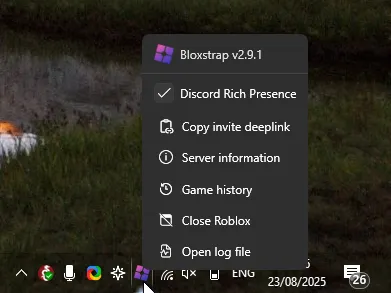
- **Discord Rich Presence:** Show the exact experience you are playing and let friends join your server directly through Discord RPC.
- **GUI Engine & FastFlag Controls:** Adjust framerate caps, Direct3D 11 / Vulkan rendering, and lighting modes under Engine.
Pages in Bloxstrap Hardware & Performance Routes
- Low-End Laptop & Integrated Graphics: Maximum FPS & Lowest Input Lag — Recommended Bloxstrap preset for eliminating frame drops and input delay in competitive fighting and shooter games on Low-End Laptop & Integrated Graphics (Direct3D 11 or Direct3D 10, 60 or 120 FPS).
- Low-End Laptop & Integrated Graphics: Stutter Reduction & Server Region Check — Recommended Bloxstrap preset for stabilizing 1% low frame times and verifying you joined a nearby low-ping server on Low-End Laptop & Integrated Graphics (Direct3D 11 or Direct3D 10, 60 or 120 FPS).
- Low-End Laptop & Integrated Graphics: Discord Rich Presence & Join Button — Recommended Bloxstrap preset for showing live game details and letting friends join your server from Discord on Low-End Laptop & Integrated Graphics (Direct3D 11 or Direct3D 10, 60 or 120 FPS).
- Low-End Laptop & Integrated Graphics: Classic Oof Sound, Cursors & Custom Font — Recommended Bloxstrap preset for restoring classic Roblox audio/cursors and crisp custom UI typography on Low-End Laptop & Integrated Graphics (Direct3D 11 or Direct3D 10, 60 or 120 FPS).
- Low-End Laptop & Integrated Graphics: Ultra Lighting, 4x MSAA & Crisp DPI — Recommended Bloxstrap preset for maximizing visual fidelity, sharp 4x anti-aliasing, and native 1:1 DPI resolution on Low-End Laptop & Integrated Graphics (Direct3D 11 or Direct3D 10, 60 or 120 FPS).
- Low-End Laptop & Integrated Graphics: Crash-Free Stability & Safe Defaults — Recommended Bloxstrap preset for preventing white-screen hangs and Memory Dump crashes after Wednesday Roblox updates on Low-End Laptop & Integrated Graphics (Direct3D 11 or Direct3D 10, 60 or 120 FPS).
- Low-End Laptop & Integrated Graphics: PvP Arena & FPS Competitive Config — Recommended Bloxstrap preset for clean hit visibility, high refresh rate, and zero top-bar interruptions on Low-End Laptop & Integrated Graphics (Direct3D 11 or Direct3D 10, 60 or 120 FPS).
- Low-End Laptop & Integrated Graphics: Low-CPU Grinding & Long-Session Config — Recommended Bloxstrap preset for keeping GPU temperatures and RAM usage low during multi-hour grinding sessions on Low-End Laptop & Integrated Graphics (Direct3D 11 or Direct3D 10, 60 or 120 FPS).
- 144Hz Competitive Gaming PC: Maximum FPS & Lowest Input Lag — Recommended Bloxstrap preset for eliminating frame drops and input delay in competitive fighting and shooter games on 144Hz Competitive Gaming PC (Direct3D 11, 144 or 165 FPS).
- 144Hz Competitive Gaming PC: Stutter Reduction & Server Region Check — Recommended Bloxstrap preset for stabilizing 1% low frame times and verifying you joined a nearby low-ping server on 144Hz Competitive Gaming PC (Direct3D 11, 144 or 165 FPS).
- 144Hz Competitive Gaming PC: Discord Rich Presence & Join Button — Recommended Bloxstrap preset for showing live game details and letting friends join your server from Discord on 144Hz Competitive Gaming PC (Direct3D 11, 144 or 165 FPS).
- 144Hz Competitive Gaming PC: Classic Oof Sound, Cursors & Custom Font — Recommended Bloxstrap preset for restoring classic Roblox audio/cursors and crisp custom UI typography on 144Hz Competitive Gaming PC (Direct3D 11, 144 or 165 FPS).
- 144Hz Competitive Gaming PC: Ultra Lighting, 4x MSAA & Crisp DPI — Recommended Bloxstrap preset for maximizing visual fidelity, sharp 4x anti-aliasing, and native 1:1 DPI resolution on 144Hz Competitive Gaming PC (Direct3D 11, 144 or 165 FPS).
- 144Hz Competitive Gaming PC: Crash-Free Stability & Safe Defaults — Recommended Bloxstrap preset for preventing white-screen hangs and Memory Dump crashes after Wednesday Roblox updates on 144Hz Competitive Gaming PC (Direct3D 11, 144 or 165 FPS).
Frequently asked questions
Where do I download Bloxstrap for Windows?
Get the Windows installer directly from /download on this host, then make sure the Microsoft .NET 6 Desktop Runtime x64 is installed.
Is Bloxstrap safe to use with Roblox's 64-bit Hyperion anti-cheat?
Yes. Bloxstrap never modifies running process memory or injects DLLs; it only writes standard configuration files (`ClientAppSettings.json`) and launches the official Roblox binary.