About Bloxstrap Mods & File Customizations
Safe asset-folder mods in Bloxstrap: classic oof sound, 2006/2013 cursors, custom TTF/OTF fonts, emoji sets, and desktop icons. Applying persistent client file replacements across Roblox updates without touching game memory or triggering anti-cheat.
Bloxstrap is a drop-in replacement only for the Roblox bootstrapper — it downloads, configures, and starts the official signed `RobloxPlayerBeta.exe` client without ever injecting DLLs or tampering with game memory.
Get the latest Windows installer from /download or explore the configuration guides below.
Core Bloxstrap advantages on Windows
- **Persistent Mods:** Custom death sounds, cursors, and fonts inside Mods survive Wednesday Roblox updates automatically.
- **Discord Rich Presence:** Show the exact experience you are playing and let friends join your server directly through Discord RPC.
- **GUI Engine & FastFlag Controls:** Adjust framerate caps, Direct3D 11 / Vulkan rendering, and lighting modes under Engine.
Pages in Bloxstrap Mods & File Customizations
- Classic 'Oof' Death Sound — Restores the iconic pre-2022 Roblox 'oof' death sound automatically across every client update. Configured via Mods → Use old death sound.
- Fix Classic 'Oof' Death Sound Not Working in Bloxstrap — Step-by-step fix if Classic 'Oof' Death Sound fails to load or gets overwritten in Roblox on Windows.
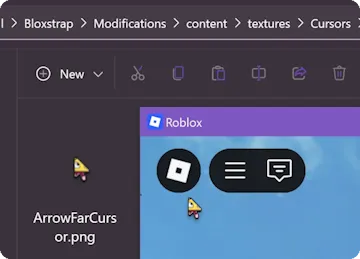
- 2006 & 2013 Classic Mouse Cursors — Swaps the modern angular pointer for the classic 2006 white glove/arrow or the 2013 pointy Roblox cursor. Configured via Mods → Mouse cursor.
- Fix 2006 & 2013 Classic Mouse Cursors Not Working in Bloxstrap — Step-by-step fix if 2006 & 2013 Classic Mouse Cursors fails to load or gets overwritten in Roblox on Windows.
- Custom In-Game Font (TTF / OTF) — Replaces default Builder Sans / Gotham UI text across all Roblox menus and chat boxes with any `.ttf` or `.otf` font file on your PC. Configured via Mods → Choose custom font.
- Fix Custom In-Game Font (TTF / OTF) Not Working in Bloxstrap — Step-by-step fix if Custom In-Game Font (TTF / OTF) fails to load or gets overwritten in Roblox on Windows.
- Classic Avatar Editor Background — Brings back the nostalgic wardrobe and brick-wall dressing room inside the Roblox desktop app avatar editor. Configured via Mods → Use old avatar background.
- Fix Classic Avatar Editor Background Not Working in Bloxstrap — Step-by-step fix if Classic Avatar Editor Background fails to load or gets overwritten in Roblox on Windows.
- Twemoji, Fluent UI & Catmoji Emoji Presets — Swaps the standard Roblox chat emoji set between Twitter Twemoji, Windows 11 3D Fluent UI, Google Noto, or Catmoji. Configured via Mods → Emoji preset.
- Fix Twemoji, Fluent UI & Catmoji Emoji Presets Not Working in Bloxstrap — Step-by-step fix if Twemoji, Fluent UI & Catmoji Emoji Presets fails to load or gets overwritten in Roblox on Windows.
- 2014 Classic Character Movement Sounds — Restores the classic 2014 footsteps, jumping, swimming, and climbing sound effects. Configured via Mods → Simulate old character sounds.
- Fix 2014 Classic Character Movement Sounds Not Working in Bloxstrap — Step-by-step fix if 2014 Classic Character Movement Sounds fails to load or gets overwritten in Roblox on Windows.
- Disable Roblox Desktop App (Close on Game Exit) — Closes Roblox cleanly to the Windows desktop when you leave a game server instead of dropping into the sluggish Lua home screen. Configured via Mods → Disable desktop app.
- Fix Disable Roblox Desktop App (Close on Game Exit) Not Working in Bloxstrap — Step-by-step fix if Disable Roblox Desktop App (Close on Game Exit) fails to load or gets overwritten in Roblox on Windows.
Frequently asked questions
Where do I download Bloxstrap for Windows?
Get the Windows installer directly from /download on this host, then make sure the Microsoft .NET 6 Desktop Runtime x64 is installed.
Is Bloxstrap safe to use with Roblox's 64-bit Hyperion anti-cheat?
Yes. Bloxstrap never modifies running process memory or injects DLLs; it only writes standard configuration files (`ClientAppSettings.json`) and launches the official Roblox binary.